Pi Loom
By Russell Barnes. Posted

A weaving wonder controlled entirely by Raspberry Pi

When Fred Hoefler sent back a computer-controlled tabletop loom after it stopped working with his MacBook Pro, his wife Gina suggested that he should be able to build one with “one of those Raspberry Pi things of yours.” Fred recalls, “The most reasonable answer I could come up with was: ‘as a matter of fact, I think I can.’” A project was born.
The full article can be found in The MagPi 52 and was written by Phil King.
At the outset, Fred set out some ground rules for building the new four-harness tabletop loom. As well as being controllable by a Raspberry Pi via the Bash console, no part of the hand-built loom was to cost more than the Pi itself. It would also need to be quiet enough to carry on a conversation in the same room with it.
Following a year of work, with many stops and starts, the end result is a working Pi-powered loom that meets all Fred’s goals. “Basically, the Raspberry Pi drives four 12-volt DC motors turning in opposite directions, like a robot that rolls forward and backward,” he explains. “These motors are attached to actuator arms that are in turn attached to a cord that runs through a pulley system to individual loom harnesses.”
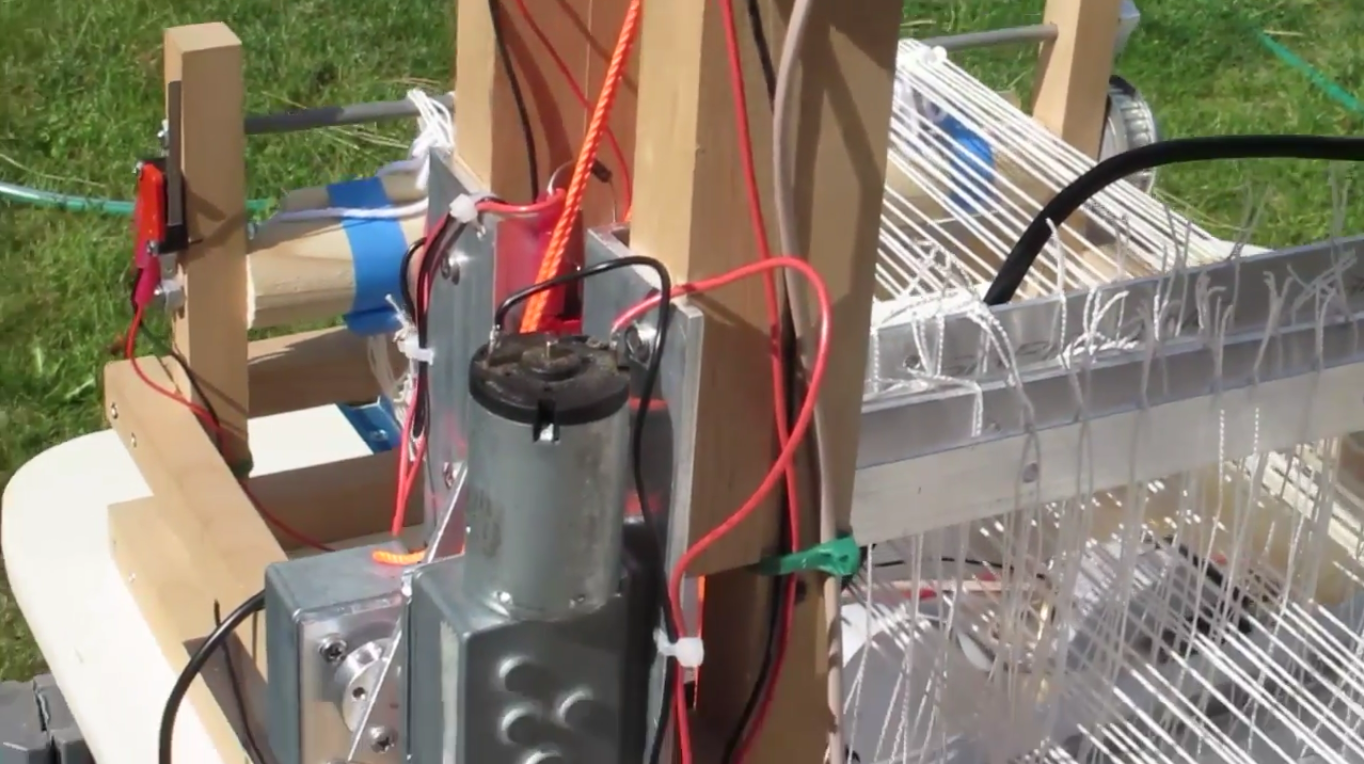
Fortunately, Fred had some previous electronics experience from his earlier career as an aircraft mechanic and electrician. “I was quite used to working with wiring, relays, switches, and motors. Working with aircraft aluminium, making brackets and such is also second nature to me.” The project wasn’t without the odd mishap, however. As Fred discovered the hard way, “A Raspberry Pi cannot directly control common motor power. You must use some kind of motor control circuit. I thought I would try to use a half-bridge MOSFET controller (a TI SN754410) that claimed to be able to handle up to 1 amp, and have all sorts of protection between the power circuit and the GPIO circuit.” After one working motor test cycle, the result was a fried Pi: “We held an appropriate memorial.”
To his surprise, Fred had less trouble programming a Python script (which can be found on his website) to control the loom. “Python works like the old BASIC interpreters we used back in the early 1970s, only easier. There are lots of Python examples out there explaining how to turn on and off GPIO pins… Once I set up how to control one harness with a module, all I had to do was copy-paste a duplicate module and change the calling parameters to control the next harness.”

While Fred admits the loom is too slow to use for production purposes and requires an operator to send the weft threads through the shed by hand, he is looking to improve it by experimenting with different 12V actuators and possibly solar power. “Finally, I found that the manufacturer of the ‘cute little loom’ that started this whole project has halted production due a supplier not being able to produce a reliable control unit. If we could just send him a copy of this article and offer to upgrade the control unit…”

Russell runs Raspberry Pi Press, which includes The MagPi, Hello World, HackSpace magazine, and book projects. He’s a massive sci-fi bore.
Subscribe to Raspberry Pi Official Magazine
Save up to 37% off the cover price and get a FREE Raspberry Pi Pico 2 W with a subscription to Raspberry Pi Official Magazine.
More articles

Make a Smart Home in Raspberry Pi Official Magazine issue 167
The dream of smart, connected devices controlling your home automatically, is especialy appealing on a lazy day when we’re trying to get work done in a heatwave. Maybe this will be the year we finally integrate temperature sensors with fans and a drinks dispenser to keep us cool, or maybe not, but we do know […]
Read more →

Win 1 of 3 Pironman 5 Pro Max cases!
Transform your Raspberry Pi with this amazing case
Read more →

Learning to code in an AI age
A new Raspberry Pi Foundation course helps young people learn to code.
Read more →