PiPower 5
By Phil King. Posted
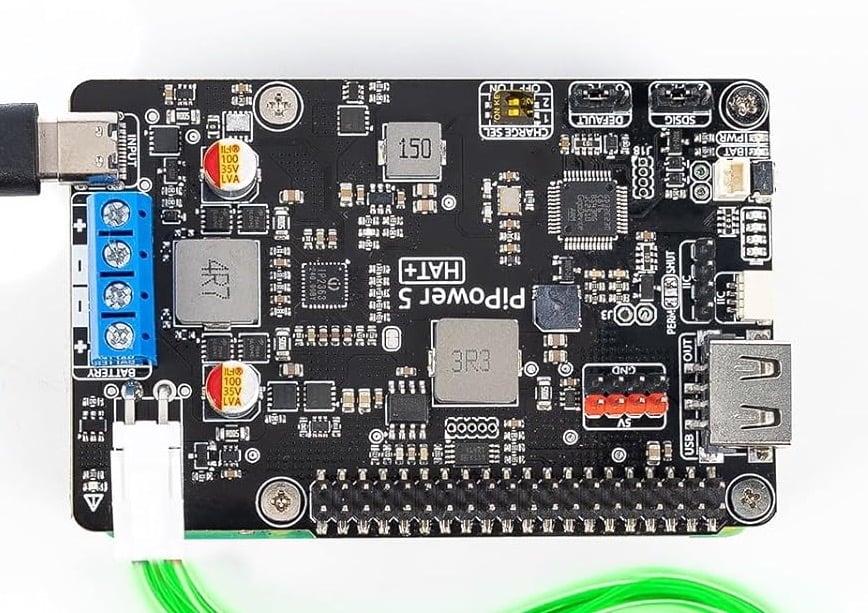
Dealing with unscheduled power outages has always been an issue for computer users. Not only is it inconvenient when you’re working on something, it may cause data loss and the corruption of system files. If you’re using your Raspberry Pi as a server, NAS, or any other project that needs to stay up and running, an uninterruptible power supply (UPS) is essential, instantly switching the power supply to a battery when needed.
Cyberdeck projects – survive in style with Raspberry Pi!
We’ve seen a few UPS solutions for Raspberry Pi before, but perhaps none quite as sophisticated and versatile as SunFounder’s new PiPower 5 (£35/$35). Building on previous iterations, its two-cell rechargeable battery pack can now supply enough current (5A at 5V) to power a Raspberry Pi 5, along with most other 40-pin models (except the keyboard computers). Thanks to an on-board microcontroller chip, it also boasts some smart power management features and can even send you email notifications for specific events.
Stacking up
Upon unboxing the product, you’ll find the PiPower 5 HAT along with the battery pack, a few other bits, and assembly instructions. The battery pack sits on an acrylic base plate, stuck to it with an adhesive strip. You then attach four stand-offs to secure Raspberry Pi 5 (or other standard-size model) above – if using a Raspberry Pi Zero 2 W, there are slightly longer stand-offs for the empty side. You then add four more stand-offs for the HAT, which connects to Raspberry Pi via an extended female header and has a pass-through header to extend all the GPIO pins – the HAT only uses the I2C pins and GPIO 26. Finally, plug the cable from the battery pack into a port on the HAT.
Before using it for the first time, you’re advised to do a full battery charge to ensure optimal performance. Just connect a standard Raspberry Pi 5 power supply to the USB-C port on the HAT. During charging, four LEDs blink to show the charge level of the battery; they also act as status indicators for certain conditions, such as the two middle ones flashing while waiting for a system shutdown signal. Once the battery is fully charged, it should have enough juice to keep a Raspberry Pi 5 powered for up to around five hours, depending on the workload.
Power tools
To make the most of the setup, you should install the special PiPower 5 Tool by cloning the GitHub repository and running an installation script. You can then access a web dashboard from any device on the network by navigating to your Raspberry Pi’s IP address with the port number 34001. Here you can view all sorts of detailed system info, such as battery level, power drain, CPU/GPU temperature, storage, memory, network, and processor usage. You can also set the ‘shutdown percentage’: the battery level at which the system will automatically shut down.
Usefully, the PiPower 5 supports event notifications for conditions such as when battery power is activated or the battery level is low. Notifications can be set via the web dashboard or terminal and may result in a buzzer alert and/or an email being sent. For the latter, you’ll need an email provider that uses an SMTP server; for Gmail, you just need to generate an App Password.
A nice bonus is that you can interact with the PiPower 5 in your Python scripts, using SunFounder’s SPC library that’s pre-installed in the virtual environment, to read data and handle shutdowns.
Verdict
9/10
A versatile UPS solution that works well and has some neat bonus features.
Specs
Dimensions: 85 × 56 × 65mm (stack height)
Power: 7.4V, 2000mAh two-cell 18650 Li-ion battery pack; input: 5–15V, 45W via USB-C or screw terminals; output: 5V/5A via GPIO, USB-A, and 2× 4P 2.54mm pin header
Features: 32-bit Arm Cortex-M23 microcontroller, battery status LEDs, power button, output power indicator, reverse battery warning LEDs, 2× I2C interfaces (four-pin header and Qwiic/STEMMA QT)

When not editing books and contributing to The MagPi, Phil enjoys playing the piano (badly), astronomy, and watching classic sitcoms.
Subscribe to Raspberry Pi Official Magazine
Save up to 37% off the cover price and get a FREE Raspberry Pi Pico 2 W with a subscription to Raspberry Pi Official Magazine.
More articles
CrowView Note 15.6 review
Turn your Raspberry Pi into a large laptop with a 15.6-inch screen.
Read more →
Cubism – holographic display
Bring images to life with this illusionary device.
Read more →

Pimoroni Presto review – a classy high-tech touchscreen
Is this the new pinnacle of graphic coding, or just a fancy screen in a metal case?
Read more →