Review: Squix ESPaper Plus
By Ben Everard. Posted
This article was originally published as part of HackSpace magazine, which has since been incorporated into Raspberry Pi Official Magazine.
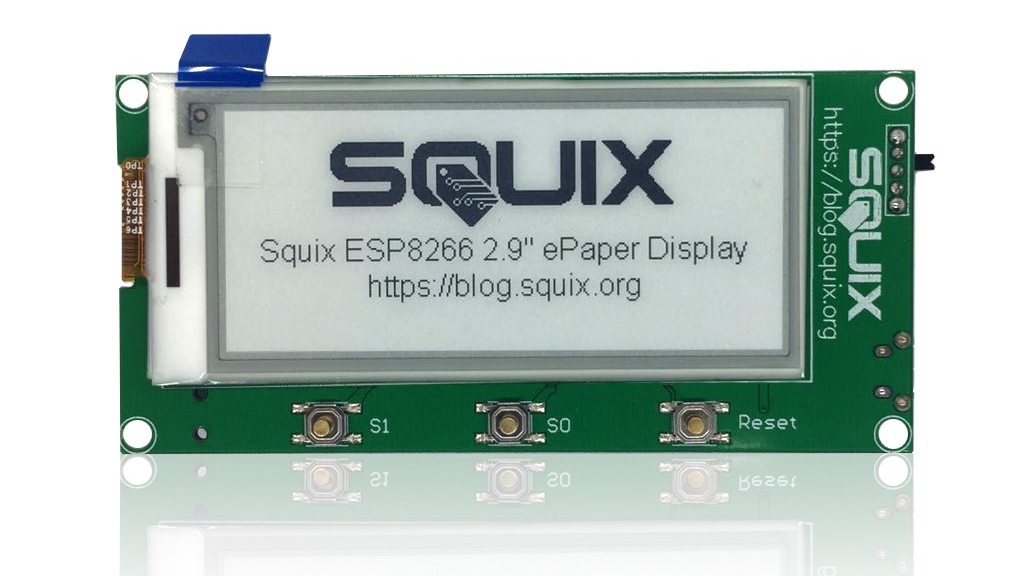
The Squix ESPaper kit is an ESP8266 module that comes with a ready-to-use ePaper display. The kit comes in two varieties: Lite and Plus. The Lite kit contains an ESP8266 Wroom-02 module, 296 × 128 black and white ePaper, and LiPo charging circuit and costs $39.90. For an extra $10, you can get the Plus kit, which also includes an acrylic enclosure, a USB-to-serial adapter, and a 600 mAh battery.

The ESP8266 provides a WiFi connection, three buttons for user input, and a micro USB port for charging, but that’s about it. There aren’t any easily accessible pins (other than the serial connection), so this is primarily for displaying data that’s pulled in over the network.
The hardware is designed for low-power usage, so it can run for days at a time on a single charge.

The setup guide shows you how to install a sample application that displays the local weather information (pulled from Wunderground). For someone who’s at least moderately familiar with using the Arduino IDE, it’s nicely straightforward to follow and doesn’t take very long to get the unit working. That, however, is where the documentation ends.
If you follow the setup guide, you should have the Arduino IDE running and able to connect to your device. The extra information you need to get things working on your ESPaper device is understanding how to write data to the display. Daniel Eichhorn – the man behind Squix – has created a library for doing this (Mini Grafx), however, it’s not well documented. You’ll need to take a look at the code for the weather station to see how it works. Experienced programmers should find it fairly straightforward to get to grips with, but beginners may struggle.
The acrylic case that it comes in is functional, but not very aesthetically pleasing, and depending on your tastes, you may feel the need to create some other housing for it.
If you’re looking for an out-of the-box weather reporter, this kit takes a bit of setting up, and the Wunderground API it relies on has limited coverage outside of the USA (in England we were only able to get data for London and Birmingham). However, if you’re after a hackable ePaper display, the Squix ESPaper Plus is a great option.
squix.com $49.99
Verdict
An easy-to-use, low-power ePaper display, but limited by the documentation
7/10

Ben is the Editor of HackSpace magazine. When not wrangling words, he enjoys cycling, gardening, and attempting to identify wild mushrooms.
Subscribe to Raspberry Pi Official Magazine
Save up to 37% off the cover price and get a FREE Raspberry Pi Pico 2 W with a subscription to Raspberry Pi Official Magazine.
More articles

Make a Smart Home in Raspberry Pi Official Magazine issue 167
The dream of smart, connected devices controlling your home automatically, is especialy appealing on a lazy day when we’re trying to get work done in a heatwave. Maybe this will be the year we finally integrate temperature sensors with fans and a drinks dispenser to keep us cool, or maybe not, but we do know […]
Read more →
Win 1 of 3 Pironman 5 Pro Max cases!
Transform your Raspberry Pi with this amazing case
Read more →

Learning to code in an AI age
A new Raspberry Pi Foundation course helps young people learn to code.
Read more →