Keybow MINI review
By Rob Zwetsloot. Posted
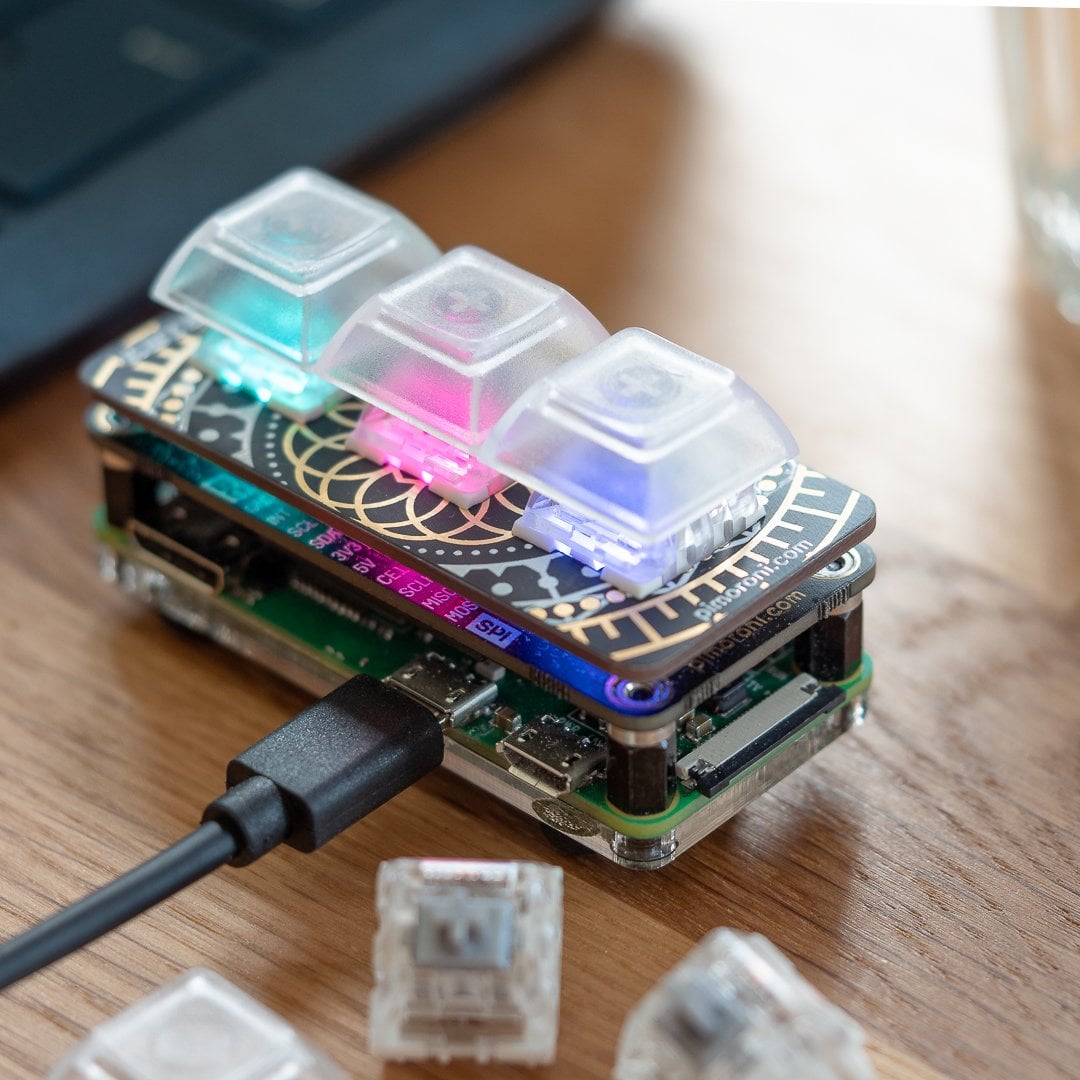
A mini mechanical keypad with light-up keys.
Advertisement
Get started with Raspberry Pi – everything you need to know to start your journey!
Honey, I shrunk the keypad. The Keybow MINI is a three-key version of the original 12-key Keybow reviewed in issue 79. This time you need to supply your own Raspberry Pi Zero (with a GPIO header), but otherwise the principle is the same: connect the keypad to another computer – with the supplied micro USB to USB-A cable – and you can customise the key mapping to use it for a wide range of purposes, such as a games controller, hotkey pad for applications, or to insert text/code snippets with a single key press.
This article first appeared in The MagPi 83 and was written by Phil King
Solderless assembly is very similar to the original Keybow and only takes 10–15 minutes. After attaching your Raspberry Pi Zero to the PCB and acrylic base, you simply push-fit three switches into a key plate (making sure they’re all orientated the same way) and add the translucent key caps before slotting into the PCB.
As before, you’ll need to supply your own microSD card for the tiny (26.6MB) Keybow OS. Upon connecting the Keybow to a computer via the USB OTG cable, the OS is loaded into a RAM disk and it boots up in just 10–15 seconds.
Unlike with the full-size Keybow, we had no problem inserting the cable into Raspberry Pi Zero’s USB OTG port as the latter is now situated on the edge of the device rather than tucked away inside.
Light it up
Once connected, the keys light up in an animated rainbow pattern (determined by a PNG file). To change this, and customise the key mapping, you need to slot the microSD card back into your computer and edit a Lua file to select a sample key layout or your own custom one, as explained in the online tutorial. As noted there, you do need to add a few lines to the default Keybow layout code, and alter some function names, to make it work on the MINI. Alternatively, there’s now a Keybow Python library that can be used within Raspbian to light and map the keys.
Either way, the real power of the Keybow MINI lies in the ability to create advanced macros to trigger a whole series of key combinations and presses with just a single key press.
Verdict
8/10
Considerably less expensive than the full-size Keybow, with the same functionality, just fewer keys. It looks cool when lit up, features a nice key action, and has multiple possible uses.

Rob is amazing. He’s also the Features Editor of Raspberry Pi Official Magazine, a hobbyist maker, cosplayer, comic book writer, and extremely modest.
Subscribe to Raspberry Pi Official Magazine
Save up to 37% off the cover price and get a FREE Raspberry Pi Pico 2 W with a subscription to Raspberry Pi Official Magazine.
More articles
Get started with Raspberry Pi in Raspberry Pi Official Magazine 161
There’s loads going on in this issue: first of all, how about using a capacitive touch board and Raspberry Pi 5 to turn a quilt into an input device? Nicola King shows you how. If you’re more into sawing and drilling than needlework, Jo Hinchliffe has built an underwater rover out of plastic piping and […]
Read more →

Win one of three DreamHAT+ radars!
That’s right, an actual working radar for your Raspberry Pi. We reviewed it a few months ago and have since been amazed at some of the projects that have used it, like last month’s motion sensor from the movie Aliens. Sound good? Well we have a few to give away, and you can enter below. […]
Read more →
RP2350 Pico W5 review
It’s Raspberry Pi Pico 2, but with a lot more memory
Read more →