Korg Monotron MIDI
By David Crookes. Posted

The Korg Monotron is a tiny analogue synthesiser capable of producing great sound and wonderful effects. It's also something of a musical bargain given that it can be picked up for less than £50. But, because it uses a linear potentiometer, or ribbon controller, rather than a keyboard, it's not the easiest of devices to operate.

Recognising that, musician and engineer Zack Scholl got to work on a solution, using a Raspberry Pi to add MIDI functionality. The end result is music to our ears since it not only makes the synthesizer infinitely more playable but has allowed Zack to record an entire music album.
“The ribbon controller made it near-impossible to play multiple notes in tune because moving your finger just a few millimetres changes the pitch,” Zack explains. “That's where adding MIDI functionality comes it handy.” Indeed, it means a wide variety of electronic musical instruments and computers can now be added. “The easiest modification is to get a keyboard that speaks MIDI and convert the MIDI notes into voltages that the Korg Monotron understands,” Zack says.
Tuning in
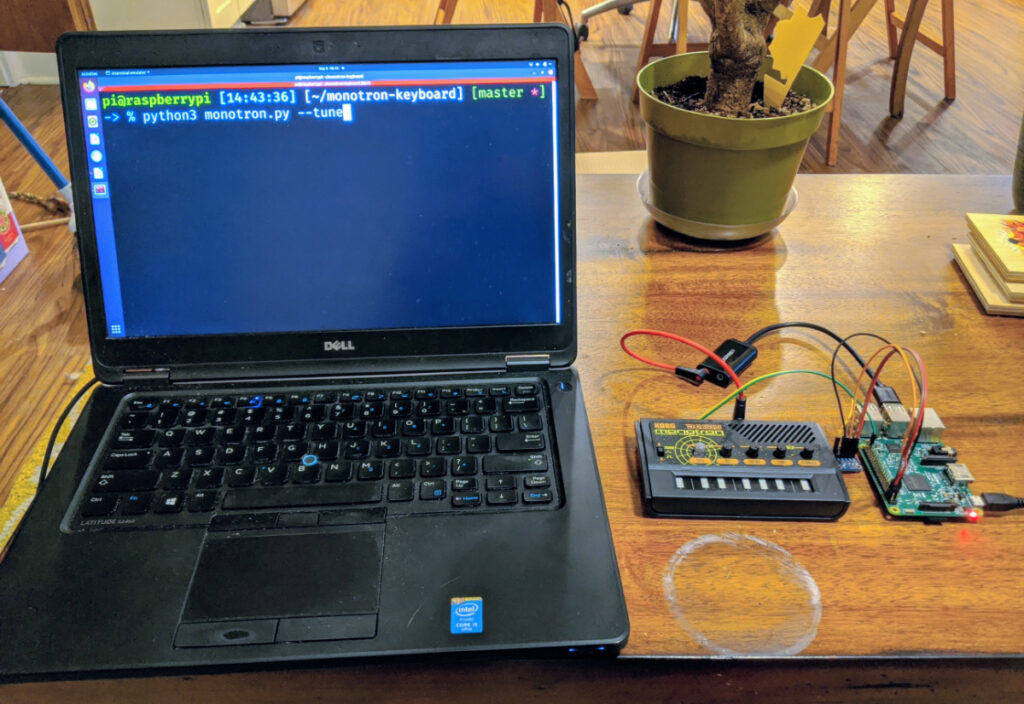
By choosing a Raspberry Pi for the project, Zack was able to avoid the pitfalls of similar mods which tend to require lots of components and PCBs. “The biggest drawback of other projects is that they have had no way of automatically tuning the Monotron – that is, they can't determine exactly which voltage corresponds to which frequency on the unit,” he says.
Zack's approach provided the ideal solution and it means he can play the Monotron with itself and other instruments. “Raspberry Pi can easily understand MIDI via USB and the MIDI input can be converted to a voltage using a DAC [Digital to Analogue Converter] plugged directly into the external pins,” he says.
Indeed, the build was relatively straightforward. “The biggest challenge has been to keep the Monotron in tune. The cheapness of the synthesizer means it doesn't have any circuits to keep the pitch locked into a certain scale or tuning, but by routing the audio from the Korg Monotron into the recording input of the USB audio device, Raspberry Pi is able to 'learn' which voltage corresponds to which frequency.”
A star is born

To achieve this, Zack wrote a custom Python script that could adjust the voltage and frequency, making use of two modes – tune and play – with the former sending out voltages and listening to the USB audio input to calculate the voltage-frequency relationship. “When you put it into play mode it will listen to MIDI and use the calculated voltage-frequency relationship to figure out which voltages to send out to the Korg Monotron, which changes its pitch according to the incoming voltage,” he reveals.
It's also possible to play the Korg Monotron without a keyboard at all. A text file can be run instead and Zack wrote the program to do this before he even created the Monotron project. “The software lets me connect to Raspberry Pi via a Secure Shell and directly write notes into a file that will be played by the Korg Monotron,” he explains.
“This was great because it turned Raspberry Pi into a self-contained musical instrument. Essentially you can just connect it to the synthesizer and it will play whatever you want. It frees up my hands to modulate the effects and it makes for some really impressive-sounding music."

Subscribe to Raspberry Pi Official Magazine
Save up to 37% off the cover price and get a FREE Raspberry Pi Pico 2 W with a subscription to Raspberry Pi Official Magazine.
More articles

Red Raven cyberdeck
Powered by drills
Read more →

MirrorBallBot
This trick uses no smoke but it does use mirrors
Read more →

Digital Displays in Raspberry Pi Official Magazine 170
Some projects seem more like magic to us than anything else; here’s one of them. This robot by Italian engineer/magician Andrea Favero uses a mirror to widen the field of vision of a Raspberry Pi Camera Module 3, the input from which is processed by Raspberry Pi 4 and used to control three legs to […]
Read more →