SPOKE review – programmable MIDI controller
By Rob Zwetsloot. Posted
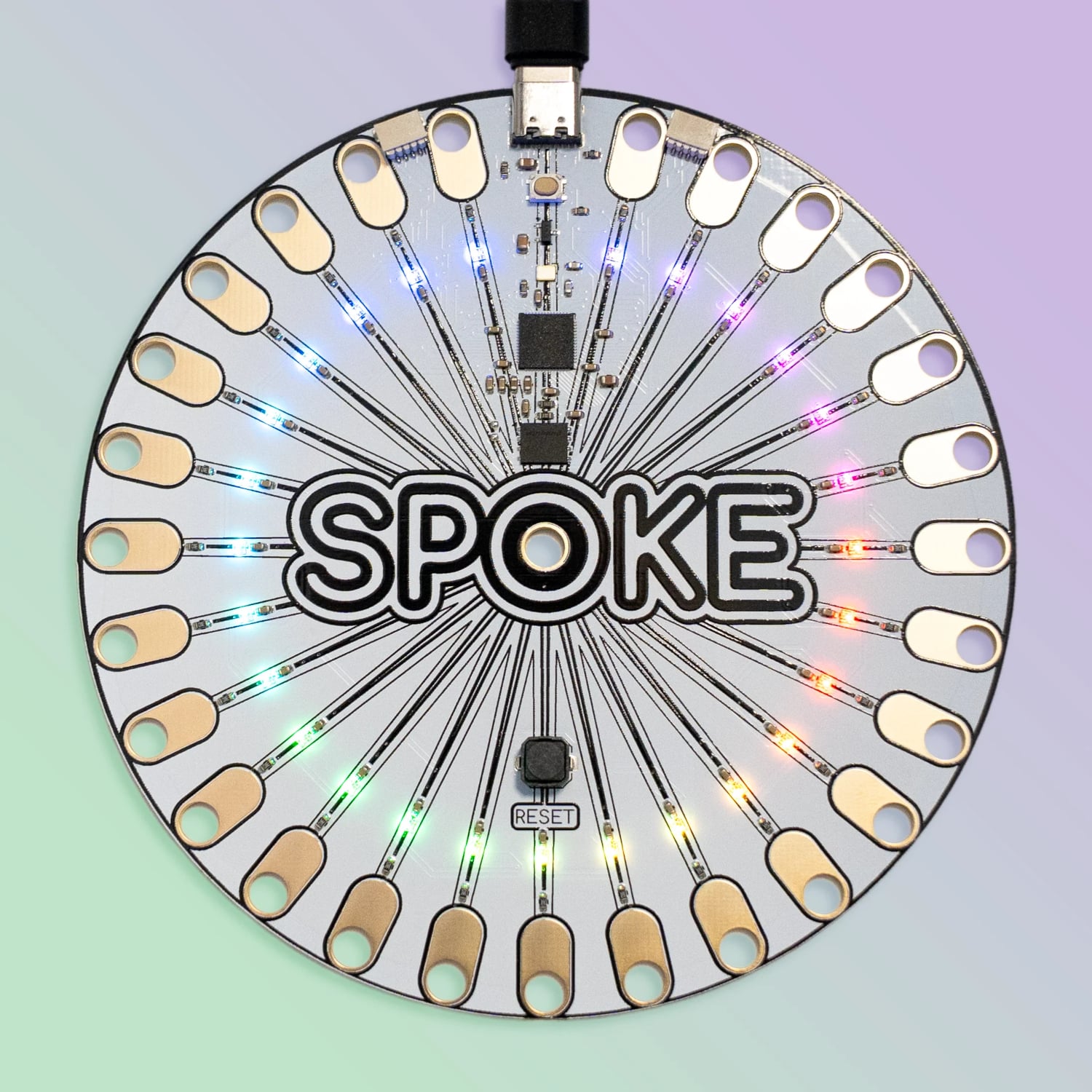
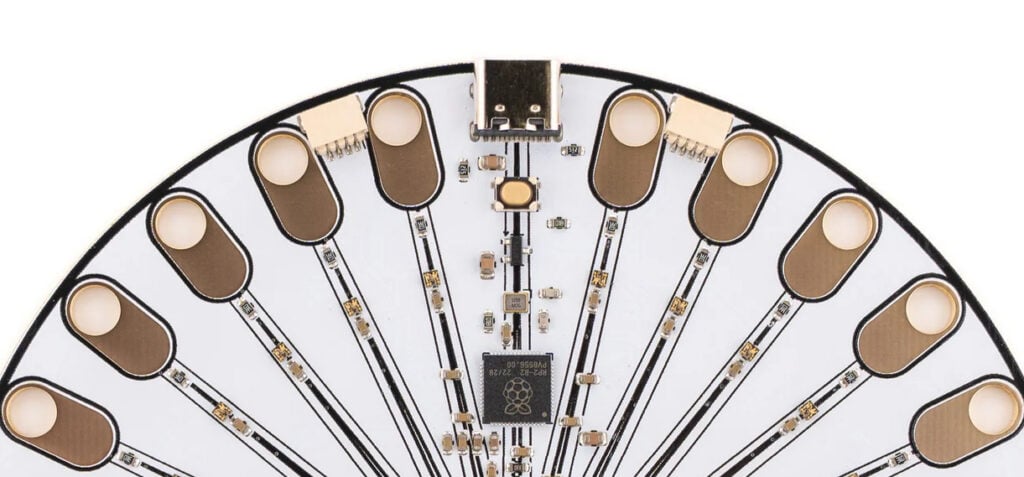
A shiny CD-sized disc with a cardboard sleeve featuring colourful fantasy artwork, the SPOKE (£40/$44) could easily be mistaken for an album by a 1990s indie band. The main difference is that it has 27 holes around its perimeter, each surrounded by a copper oval: these are capacitive touch pads. It also has a USB-C port, reset button, and a Raspberry Pi RP2040 microcontroller chip (as used for Pico).
While this is no music CD, it can act as a musical device. As soon as you connect it to a computer, the SPOKE’s default on-board program turns it into a MIDI controller, with each of the 27 touch pads playing a note when touched. Just visit spokeboard.com, click on SPOKE, enable MIDI access for your web browser, and touch a pad to hear a note.
Musical magic
Clicking the Play tab on the site takes you to a page of options for how to play with the SPOKE. To get a feel for it, you may want to start with Visualisers: a series of audio visualisers with different sounds playing as you touch the pads. Or try the Harmonic Table with 100 polygons assigned to notes. When you touch a pad on the SPOKE, its NeoPixel changes colour. By default, the touch pads are assigned to a pentatonic scale (five notes per octave), but you can easily change that by altering the note values in the default CircuitPython program.
For more sophisticated musical output, the SPOKE Audio Playground enables you to search thousands of sounds from Freesound.org, upload your own, or record them with a mic, then assign each to a touch pad. Other music-based options include a One-Shot Drum Kit and a Storytime Page where you can add sound effects to the pads to play back while reading a story aloud. As the SPOKE is acting as a standard MIDI controller, you can also use it for any software synth or DAW with MIDI input, such as the browser-based ones listed on the webpage.
As with other capacitive sensors, you can extend the touch pads by using anything conductive, such as copper tape, conductive thread or ink, even pencil lines. We hooked up some crocodile clips to pieces of fruit for a fun mini drum kit! You just need to press the Reset button to calibrate the touch sensitivity once items are connected.
Coding projects
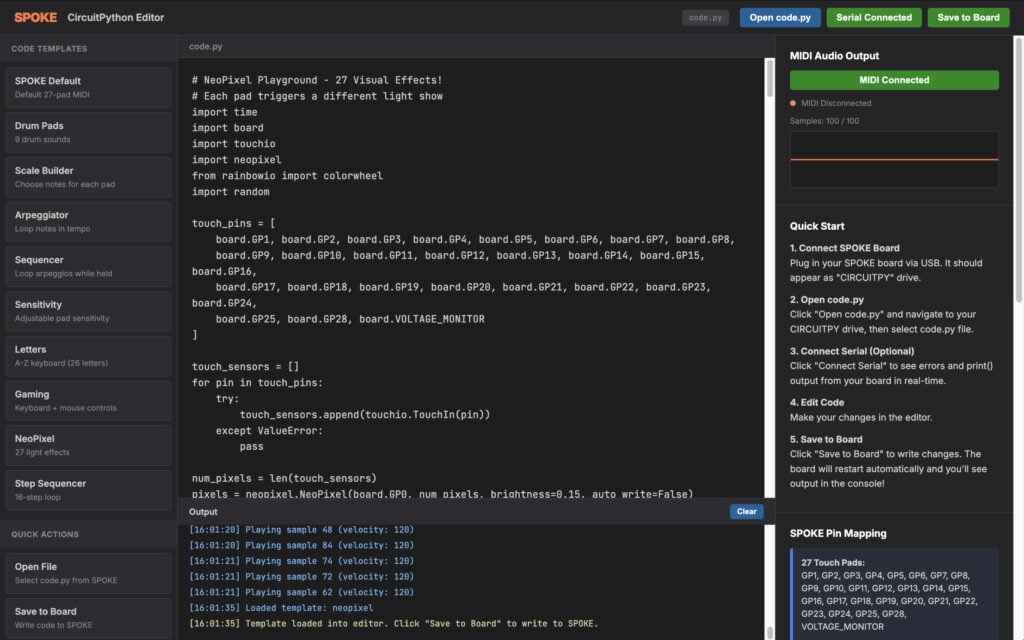
Because the SPOKE utilises CircuitPython for its firmware, you can program it just as you would a Pico, using a computer IDE like Thonny. Alternatively, the SPOKE site offers a browser-based Code Playground where you can connect via serial and try out some code examples. Along with musical programs such as an arpeggiator and step sequencer, and one for NeoPixel patterns, there are others that showcase the SPOKE’s versatility. For instance, you can get it to act as an HID (human input device) with a letter of the alphabet (plus SPACE) assigned to each pad; or even as a game controller for Minecraft, including mouse buttons. For those new to coding, there’s also a handy Learn To Code page to get you started.
To get an idea of what you can make with a SPOKE, there are some project examples on the website, including some novel musical instruments (such as a bonsai tree) and an interactive map that plays different videos when hidden sensors are touched.
The only slight downside to the SPOKE is its size, which could make it difficult to embed in smaller projects – in which case, you may well prefer to use the SPOKE-mini DIY kit with a PCB and a Pico and resistors to solder onto it.
Either way, the SPOKE is a fun, versatile touch controller that’s easy to start using and coding for your own projects.
Verdict
9/10
A well-designed touch controller that can also act as a MIDI input or HID.

Rob is amazing. He’s also the Features Editor of Raspberry Pi Official Magazine, a hobbyist maker, cosplayer, comic book writer, and extremely modest.
Subscribe to Raspberry Pi Official Magazine
Save up to 37% off the cover price and get a FREE Raspberry Pi Pico 2 W with a subscription to Raspberry Pi Official Magazine.
More articles

Liverpool MakeFest 2026 report
The UK’s largest free maker event celebrates creativity, arts, science, and technology
Read more →

D&D Book
A near magical book with ever-changing pages.
Read more →
Incredible Weather Projects in Raspberry Pi Official Magazine issue 171
If the planet gets too hot/too cold/too drizzly for human habitation, we’ll probably want to leave Earth in search of a better one. That means we’ll need a flight computer, and maker Michael Newton is one step ahead: he’s built a replica of the DSKY (display keyboard) interface from the Apollo Guidance Computer. Now you […]
Read more →