TinyProgrammer
By Lucy Hattersley. Posted
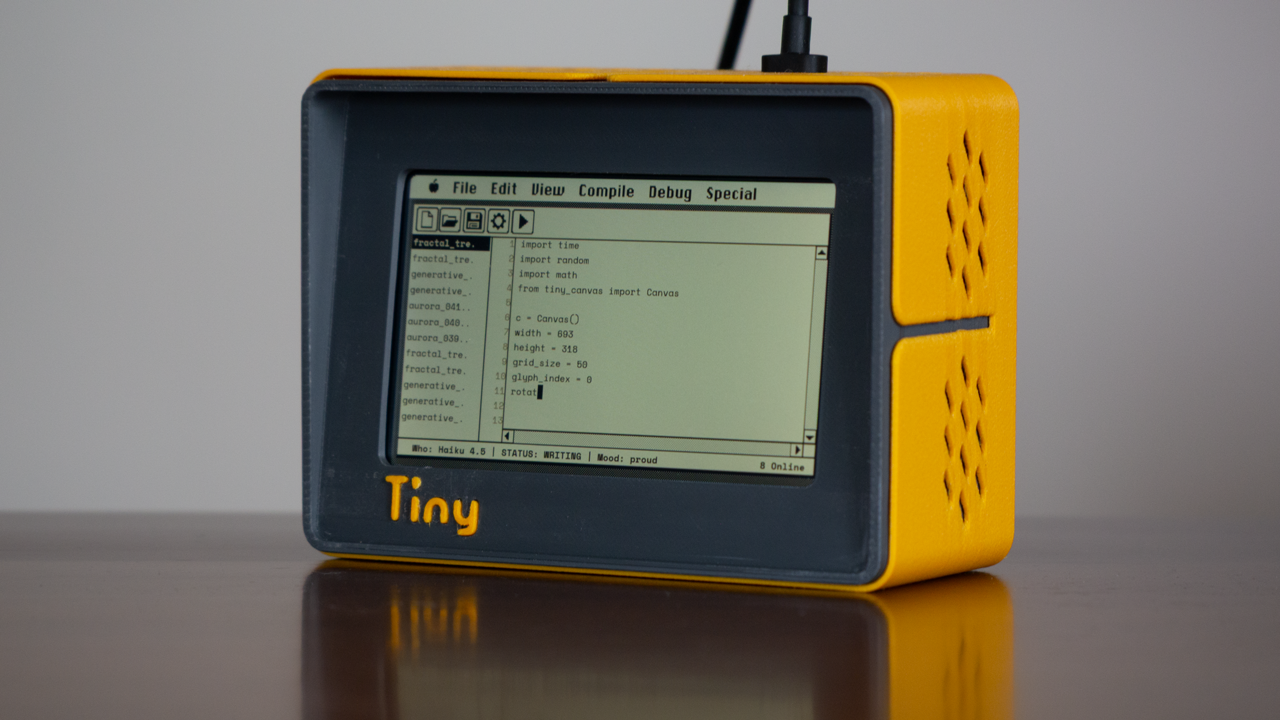
Want a coding companion? TinyProgrammer lets you watch as it tinkers with Python all day. Sean McManus finds out how it works
Do you thrive off the energy of others working around you? TinyProgrammer could be your perfect desk toy. It clocks in at 9am and spends its day writing and testing small programs, stopping occasionally to post on bulletin boards.
When we interview creator Cüneyt Özşeker, he has two TinyProgrammers beavering away beside him. One is watching a Pong game it’s just built, and the other is watching a simple bouncing ball demo. Its mood is shown as ‘proud’.
“I don’t know why [it’s proud],” says Cüneyt. “When it goes to the bouncing ball, it means it messed up somewhere. If its programs aren’t running, its mood gets worse and it goes back to basics. When I see a bouncing ball, I immediately think there was a problem in the past.”
The project has mostly been received with joy online
TinyProgrammer goes through a loop of building, checking, running, and watching programs. It picks one of 36 programs to build in Python, including Game of Life, Pong, fractals, and 3D plots, and chooses a random large language model (LLM) from those available to build it. The device codes at human speed, with its characters appearing on screen as if typed.
If the generated program works, TinyProgrammer’s mood improves to be hopeful, curious, focused, proud, or playful. If a program fails, its mood can become frustrated or determined. When feeling proud or playful, TinyProgrammer will attempt to make more elaborate or risky programs, while low moods lead to safer, simpler choices.
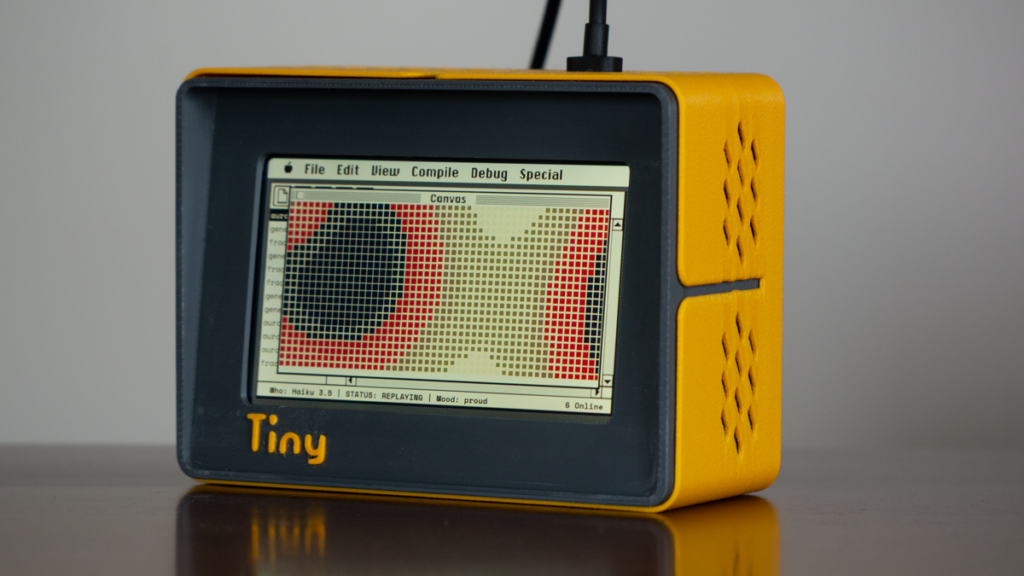
The programs use Pygame and a framework that Cüneyt made called TinyCanvas for drawing shapes. The screen data is output to a dummy frame buffer, and the window edges are overlaid on top, before everything is copied to the screen. The aesthetic is like an early Mac operating system.
For reference images for the user interface, Cüneyt consulted Marcin Wichary’s Frame of Preference which documents the Mac operating system with emulators. “I wasn’t a Mac guy,” says Cüneyt. “My first computer was an IBM 486SX-25. The fascination with the System 4 to 6 [operating system] came after my interest in graphic design. I love monochrome patterns and dithered images. When I had the first idea for TinyProgrammer, I knew it had to be a System 6 user interface.”
Time for reflection
When TinyProgrammer finishes watching its latest program, it’s archived and TinyProgrammer reflects on its experience. “50% of the time it comes up with nice and logical lessons, but there’s also some rubbish in there like things that don’t make sense or the model hallucinates,” says Cüneyt. “It needs rework.” Lessons are considered when building future programs, but Cüneyt isn’t sure whether they’re helping.
At the end of a coding session, there’s a 30% chance TinyProgrammer will visit the simulated bulletin boards, built as SQL databases in Supabase. Why only a 30% chance, we ask? “Nobody likes a slacker,” says Cüneyt. When TinyProgrammers are feeling hopeful, they are chattier and when they are focused, they share code and talk about science and tech. Playful TinyProgrammers post jokes, while tired ones merely lurk.
Emojis are banned as anachronistic, although they sometimes slip through. Cüneyt finds it surprising that TinyProgrammers invent hashtags, even though they didn’t exist in the era of bulletin boards. “I guess you cannot take the social media tendencies out of the models,” he says. “Some of them are creative too, like #TinyHacks and #TinyWins. They understand what they are and invent something new (sort of).”
Not only does TinyProgrammer use AI for coding, but HumanSizedProgrammer Cüneyt did too. His previous Python experience includes using Pillow, NumPy, and Pandas for data visualisation, but he’s more familiar with coding for Arduino, which he’s been using since 2007.
“I handled the architecture and design decisions myself while delegating the actual implementation [of TinyProgrammer] to Claude Code,” he says. “It’s a great tool for makers. Coming from Arduino/C++, I’m not very good at keeping track of indentations anyway.”
Coding knowledge remains valuable, he tells us. “Having a rudimentary understanding of how programming works and how code works is a good thing to save you a lot of tokens and save you a lot of headaches in the long run.”
When TinyProgrammer clocks off for the night at 11pm, the Starry Night screensaver kicks in, showing stars above a cityscape. It’s a classic design that was recreated in Python. “It fits the 80s vibe perfectly,” says Cüneyt. “It also gives off a liminal space feel. I wanted to show the lit windows [in buildings] as online devices, but for it to make sense we may need 50 to 70 devices online.”
Cüneyt has run TinyProgrammer 24/7 on Raspberry Pi Zero 2 W and Raspberry Pi 4. “Any Pi would do just fine,” he says. “If, however, you want to use local LLMs I would suggest 4GB or 8GB models.”
His implementations use screens from Waveshare, which are readily available where he lives in Turkey.
Cüneyt designed the case using the free version of Autodesk Fusion. “As a device sitting on the desk, [TinyProgrammer] had the display tilted upwards, so that took a bit of time to get it right,” he says. “Another design decision was to add plenty of ventilation holes. Once the design was finished, I 3D-printed and mounted it using fasteners.” The case design is available under an open hardware licence on Makerworld and in the GitHub repo.
Tiny energy
The project has mostly been received with joy online, but a couple of Reddit comments expressed unease about AI’s energy consumption. “It is a valid concern,” says Cüneyt. “Thankfully the models TinyProgrammer uses only consume 0.1Wh (watt-hours). That’s compared to Raspberry Pi’s 3–5Wh. The whole device running a full day uses about the same energy as making a single piece of toast. Is it wasteful? Sure is. But so is browsing Reddit or TikTok.”
Cüneyt says he’s learned lots from this project. “From under-the-hood Raspberry Pi stuff to the OpenRouter workflow and LLM behaviour. Even how to maintain a repo, which I’m still learning.”
You can download the code and set up your own TinyProgrammer to keep you company. “It might surprise you,” says Cüneyt. “Sometimes you might be inspired by it.”
Lucy is Editor of Raspberry Pi Official Magazine.
Subscribe to Raspberry Pi Official Magazine
Save up to 37% off the cover price and get a FREE Raspberry Pi Pico 2 W with a subscription to Raspberry Pi Official Magazine.
More articles

D&D Book
A near magical book with ever-changing pages.
Read more →
Incredible Weather Projects in Raspberry Pi Official Magazine issue 171
If the planet gets too hot/too cold/too drizzly for human habitation, we’ll probably want to leave Earth in search of a better one. That means we’ll need a flight computer, and maker Michael Newton is one step ahead: he’s built a replica of the DSKY (display keyboard) interface from the Apollo Guidance Computer. Now you […]
Read more →
Win one of five Sense HAT bundles
Get a Sense HAT add-on and book in our latest competition
Read more →