PolaPi-Zero: a Polaroid-style camera
By Lucy Hattersley. Posted

The tiny Zero-powered thermal-printing camera that recreates the joy of using a Polaroid

The PolaPi-Zero is the second iteration of Pierre Muth’s exploration into portable photography with the Raspberry Pi and thermal printer. No stranger to thermal printing builds, he’s previously created such wonders as a camera booth lottery ticket system. Take your photo and if your thermal printout displays another’s face, locating them grants you both a free beer.
Pierre Muth is an electronic technician with a love for making things, thermal printers, and the Adafruit Big Red Button.
So while his original PolaPi model also housed a Raspberry Pi – the version 2, with a full-size casing – the newer model allows for a smaller body with its use of the Raspberry Pi Zero.
We’ve seen many digital camera builds using the Raspberry Pi and Camera Module. From 3D-printed cases to retrofit vintage classics, the majority act as simple point-and-shoot cameras. The PolaPi-Zero, however, takes its lead from the iconic Polaroid camera, utilising a thermal printer inside its body to deliver instant prints of your subject matter.
PolaPi-Zero: A Raspberry Pi and thermal-printer camera
In his original PolaPi build, Pierre had been forced to cannibalise a retail-grade thermal receipt printer, leaving the unit bulky and weighty. With the new model, following in the footsteps of the small-bodied Raspberry Pi Zero, he managed to acquire the Nano Thermal Receipt Printer from Adafruit: a smaller device marketed specifically for use with boards such as the Raspberry Pi and Arduino. Coupled with a Sharp memory LCD, the camera allows its user to see the image on screen in black and white before printing, guaranteeing the quality of the photograph before you commit to the print.
Pierre used the project as “a good excuse to start learning Python (finally)”, in part due to the array of existing Python code available online. His original camera ran using Java, and though he admits to the final Python code not being “the most elegant”, he provides it via both his GitHub repo as complete code, and as a downloadable image for the Raspberry Pi Zero.
For the physical body of the camera, Pierre designed the unit in Autodesk 123D before sending it to an external 3D printing company, 3DHubs.com, for completion. Again, he provides the case 3D print files in his GitHub repo.
Completing the build with a Pi Camera Module, a 7.2V battery with voltage regulator, and a handful of buttons, the PolaPi-Zero is good to go, providing instant gratification to any user wishing to immortalise their photography on receipt paper.
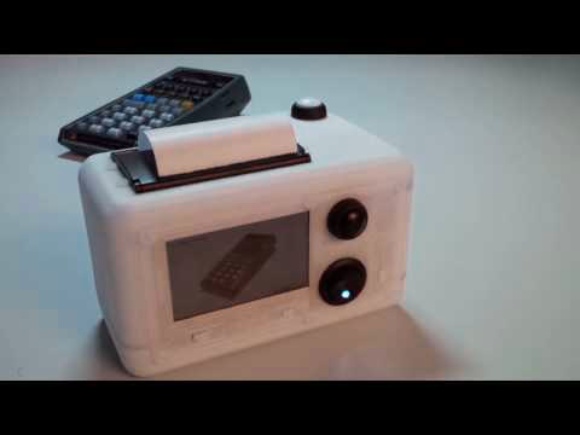
Building a Polaroid Camera with Raspberry Pi
With the technology in place, Pierre started to experiment with different styles of image capture. Starting with the idea of slit-scan photography, where a movable slide with a slit cut in it is passed between the lens and subject matter, Pierre played around with a coded variant. The result is an odd, stuttered image effect that varies depending on whether the scan reads horizontally or vertically. The continuous length of the thermal camera paper allows this effect to be captured and printed.
Pierre claims to live “always with the hope to make something and not just use something”, and as his interesting builds continue to wow us, we look forward to seeing what comes next.

Lucy is Editor of Raspberry Pi Official Magazine.
Subscribe to Raspberry Pi Official Magazine
Save up to 37% off the cover price and get a FREE Raspberry Pi Pico 2 W with a subscription to Raspberry Pi Official Magazine.
More articles

MirrorBallBot
This trick uses no smoke but it does use mirrors
Read more →

Digital Displays in Raspberry Pi Official Magazine 170
Some projects seem more like magic to us than anything else; here’s one of them. This robot by Italian engineer/magician Andrea Favero uses a mirror to widen the field of vision of a Raspberry Pi Camera Module 3, the input from which is processed by Raspberry Pi 4 and used to control three legs to […]
Read more →

Win a Development Kit for Compute Module 5
Make CM5 development easier with our competition
Read more →